A few pictures from the season: how the beds were layered, what each bed yielded, and the garden’s own mark.
The same chart, placed again further down the page.

A few pictures from the season: how the beds were layered, what each bed yielded, and the garden’s own mark.
The same chart, placed again further down the page.
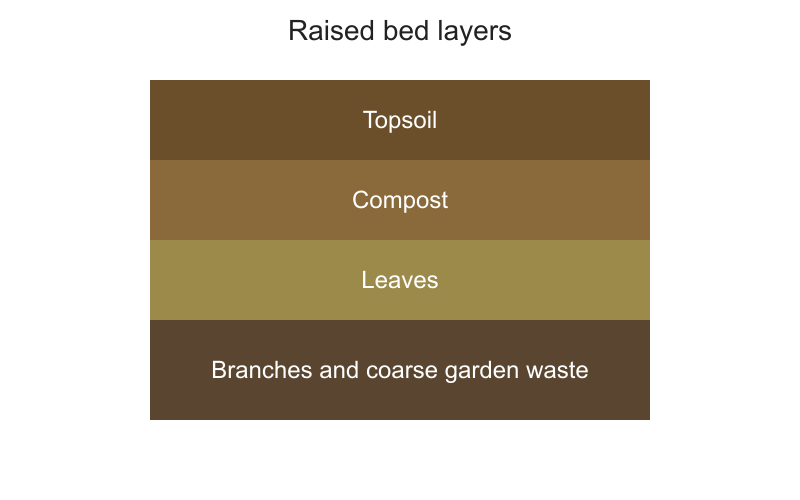
Raised beds warm up earlier in spring, drain better after heavy rain and save your back. Fill the bottom with branches and coarse garden waste, then leaves, compost and finally good topsoil.
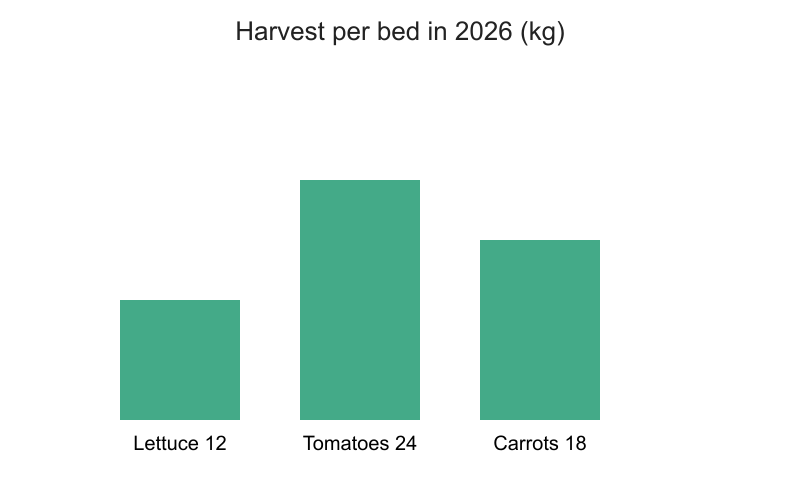
This year the tomatoes did best, followed by carrots and lettuce.

This site runs on WordPress.

Compost turns kitchen scraps and garden waste into the dark, crumbly material that feeds soil for years. A small heap in a corner of the garden is enough for most households, and it costs nothing but a little attention every few weeks. This guide walks through the whole cycle, from choosing a spot to spreading the finished compost on the beds in spring.
Most of the work happens before the first scrap goes in, because the place you choose decides how fast the heap breaks down. A shady, sheltered corner on bare soil is ideal: worms and microbes move up from the ground, rain keeps it moist without flooding it, and the sun does not dry the edges out in August. Leave enough room to turn the heap with a fork and to reach it with a wheelbarrow, and keep it a few metres from the house.
What goes in matters more than how big the bin is. Aim for roughly equal volumes of green material, such as vegetable peelings, coffee grounds and fresh grass cuttings, and brown material, such as dry leaves, shredded cardboard and straw. Greens bring nitrogen and moisture, browns bring carbon and air. Leave out meat, dairy, cooked food and diseased plants, which attract rats or spread problems back to the garden.
Turning the heap every three to four weeks keeps it working. Air reaches the middle, the outer layers move to the hot centre, and you can see at once whether it is too wet or too dry. A heap that smells sour needs more browns and a turn; one that has gone cold and dusty needs water and a forkful of fresh greens. In a warm summer a well-turned heap can be ready in three months, while an untouched one takes a year or more.
Finished compost is dark, crumbly and smells of woodland soil, with none of the original scraps recognisable. Sieve out any woody pieces and return them to the next heap. Spread a layer of about five centimetres over the beds in early spring and let worms carry it into the soil, or mix it into the planting holes of shrubs and perennials. Used this way, one heap a year is enough to keep a small garden fertile without bought fertiliser.
A few problems come up again and again, and each has a simple cause. Fruit flies mean food scraps are lying on the surface, so bury them under a layer of browns. Slow progress in winter is normal and picks up again in spring. Weeds sprouting in the finished compost mean seed heads went in, so keep flowering weeds out or put them in the council green bin instead.
The bike guide is the place to start: bike maintenance, every two weeks.
The old seed calendar moved and its address no longer loads: seed calendar. The raised bed guide covers the same months.
Both links sit in the post body, so both can be changed from Asky, and the undo puts them back as they were.
A raised bed drains faster than the ground around it, so in a dry spell it needs water every two or three days rather than once a week. Push a finger into the soil: if the top five centimetres are dry, it is time.
Water early in the morning, slowly and deeply. A soaker hose laid between the rows wets the roots without wetting the leaves, which keeps mildew away from tomatoes and courgettes.
A five centimetre layer of straw or grass clippings cuts evaporation by half. Keep it a hand away from the stems so they stay dry.
In August, when beds dry out fastest, check the mulch weekly and top it up as it settles.
A raised bed drains faster than the ground around it, so in a dry spell it needs water every two or three days rather than once a week. Push a finger into the soil: if the top five centimetres are dry, it is time.
Water early in the morning, slowly and deeply. A soaker hose laid between the rows wets the roots without wetting the leaves, which keeps mildew away from tomatoes and courgettes.
A five centimetre layer of straw or grass clippings cuts evaporation by half. Keep it a hand away from the stems so they stay dry.
In August, when beds dry out fastest, check the mulch weekly and top it up as it settles.
A small garden has room for more fruit than most people expect, as long as the trees are chosen for the space. Dwarf rootstocks keep apples and pears at two to three metres, which is easy to net, prune and pick.
Buy bare-root trees in late autumn or winter while they are dormant. They cost less than potted trees, establish faster, and the roots can be checked before planting.
Dig a hole as deep as the roots and twice as wide, loosen the sides, and plant at the same depth the tree grew in the nursery. Stake it low, water it in well, and keep the grass away from the trunk for the first two summers.
Prune in winter for shape and in summer to keep the tree small. Take out crossing branches and anything growing into the middle, and leave the short fruiting spurs alone.
Water deeply once a week in dry spells during the first years, mulch in spring, and thin the fruit in June so the branches do not snap and the remaining fruit grows large.
Raised beds warm up earlier in spring, drain better after heavy rain and save your back. A bed 120 centimetres wide can be reached from both sides without stepping on the soil.
Fill the bottom with branches and coarse garden waste, then layers of leaves, compost and finally good topsoil. The lower layers rot slowly and feed the plants for several seasons.
Plan the planting by height: tall tomatoes and beans on the north side, lettuce and herbs in front. That way nothing shades its neighbours during the long summer days.
Water in the morning, at the base of the plants, and mulch with straw or grass clippings to keep moisture in. A raised bed dries out faster than the ground, especially in July.
At the end of the season sow green manure or cover the bed with leaves. The soil stays alive over winter and is ready for planting again in April.
Tools that go into the shed dirty come out rusty in spring. An hour at the end of the season keeps them in working order for years.
Wash off the soil, dry everything properly and oil the metal. Wooden handles like a coat of linseed oil before the cold months.
Drain hoses and store them coiled and off the ground, and bring the timer and any battery tools indoors where it does not freeze.
Sharpen blades now rather than in spring, when there is never time. Secateurs and loppers benefit from a drop of oil on the pivot.
Hang long-handled tools on hooks so the blades do not stand in damp, and keep the shed ventilated through winter.
Secateurs, spades and hoes all work better when the edge is clean and sharp. Sharpening takes ten minutes a tool and saves effort all season.
Scrape off dried soil with a wire brush, then rub the metal with an oily rag. Rust comes off with fine steel wool; deep pitting means the blade is near the end of its life.
Sharpen on the bevel side only, with a flat file for spades and hoes and a small diamond stone for secateurs. Keep the original angle and work away from the edge.
Finish with a drop of oil on the pivot of secateurs and loppers, and a wipe of linseed oil on wooden handles so they do not split.
Hang the tools up rather than leaning them in a corner; a blade that stands in damp soil rusts within a week.